Random thoughts and notes on technology, science, nature, traveling etc.
Showing posts with label photography. Show all posts
Sunday, December 29, 2013
Flickr and Lumia 1020 photos
In my previous post I was promising Lumia 1020 sample photos and for some time now I've been uploading them to Flickr. Click on the link below to visit my profile consisting solely of images taken with the Nokia Lumia 1020 (filters have been added to some of the photos on-the-device).
Mobile photography with Lumia 1020 - random pictures
I hadn't used Flickr much before, but at some point they've done a nice overhaul on their user interface and I'm liking it a lot now. It's very modern and makes it easy to upload and add tags/titles to multiple photos at the same time. They also offer a whopping 1TB (yep, terabyte) of storage for your photos so it won't run out very easily!
In case you're not interested in saving photos there yourself, you can spend time browsing through some spectacular photos from all around the world taken by other users.
Flickr.com
PS. My blogging has been very limited this year and I am sorry for that. I'd still like to wish all my readers a great and successful year 2014! =)
Labels:
Flickr,
Lumia,
Lumia 1020,
mobile,
Nokia,
photography,
photos
Tuesday, September 24, 2013
Nokia Lumia 1020 unboxing
So today I finally received a delivery containing a new Nokia Lumia 1020! It's the ultimate photography phone of today with a whopping 41 megapixel sensor for clearer and sharper images. Sadly, it is also the last Nokia smartphone I'll ever own since Microsoft bought the mobile business of Nokia =(
Here's one sample photo (cropped and uncropped) of Kerava train station demonstrating the vast amount of details Lumia 1020 is capable of capturing! I'll post some sample photos later on, meanwhile you can check out some unboxing pics. I got the phone in the same signature yellow color as my Lumia 920, I think the phone looks absolutely gorgeous. Getting used to the camera bump on the back will take some time (it is "on the way" when holding it in hand), but it's the price to pay for the awesome photos, a price I'm very much willing to pay! =)
Labels:
1020,
41,
Kerava,
Lumia,
Lumia 1020,
megapixels,
mobile,
Nokia,
photography,
photos,
Pureview,
unboxing,
Windows Phone,
WP8
Sunday, August 25, 2013
Collection of Lumia 920 sample photos
Er.. it's been quite a while since my last post here, sorry about that! Nothing special has happened in my life, but perhaps after moving to capital region I've spent more time out, especially in Helsinki and it has to offer, so I've stopped writing here. Anyway, now that the summer is coming to an end I hope to write more often here!
One thing I haven't stopped at any point is taking photos. And I love to take a lot of them when I'm on the move. This year I haven't used much of my DSLR, instead I've mostly relied on my Nokia Lumia 920. While Lumia 920 has been an absolute fantastic phone, in overall quality and especially the camera, I am most probably switching to the Lumia 1020 when it comes out. Perhaps after that I can rely fully on the phone's camera even on trips from where I'd love to snap high resolution photos for print. I'll get back to that if/when I get my hands on the device. =)
Meanwhile, here's a set of over 400 unedited photos taken with the Lumia 920. There's plenty of pictures from my trips, including Tallinn, Stockholm and San Francisco. Vast majority is from and around Kerava and Helsinki where I live and work respectively. Check out the photos on my SkyDrive by clicking the image below!
One thing I haven't stopped at any point is taking photos. And I love to take a lot of them when I'm on the move. This year I haven't used much of my DSLR, instead I've mostly relied on my Nokia Lumia 920. While Lumia 920 has been an absolute fantastic phone, in overall quality and especially the camera, I am most probably switching to the Lumia 1020 when it comes out. Perhaps after that I can rely fully on the phone's camera even on trips from where I'd love to snap high resolution photos for print. I'll get back to that if/when I get my hands on the device. =)
Meanwhile, here's a set of over 400 unedited photos taken with the Lumia 920. There's plenty of pictures from my trips, including Tallinn, Stockholm and San Francisco. Vast majority is from and around Kerava and Helsinki where I live and work respectively. Check out the photos on my SkyDrive by clicking the image below!
San Francisco by Night, captured with my Lumia 920
Labels:
Lumia,
Lumia 920,
mobile,
Nokia,
photography,
photos,
Windows Phone
Saturday, November 24, 2012
Nokia Lumia 920 - my new phone!
I've got a new phone again - Nokia Lumia 920! I wanted it in yellow and boy it looks hot! Had my doubts about the glossy finish, but it's really neat. It's a nice, fresh contrast to the classy, matte black Lumia 800.
This time it's not about an actual need to take up years gap of advances as it was when I switched from iPhone 3G to Windows Phone a year ago, but more of an huge interest on the new, feature-rich WP8 flagship device from Nokia. Especially the low-light camera capabilities interest me since I like taking photos and on mixed/low-light, Lumia 800 can't do squat (see sample below).
In addition to the image stabilization feature, the phone has been packed with so much cool stuff - the super sensitive, high resolution screen (yes it looks amazingly sharp compared to Lumia 800), it has WP8 with more speed, power and customization + apps (I can now play Angry Birds Space and Star Wars!) ;D plus NFC and wireless charging that I haven't had time to test yet!
Based on two days testing, I can say that yes, Nokia really delivers this time and the floating lens stuff is not a gimmick! Sure, the photos taken in really dark night condition tend out to have some blur when zoomed 100% but most of the time the photos are truly remarkable.
PS. the phone is a bit bulky if you compare it to other smartphones out there, but I think this has been made into a much bigger "issue" than it really is. The size and weight really doesn't bother me at all, if anything it feels really solid and fits perfectly to hand!
PPS. Don't get me wrong, Lumia 800 is still a very solid smartphone and takes great daylight photos. Will get WP 7.8 on it when it comes out.
This time it's not about an actual need to take up years gap of advances as it was when I switched from iPhone 3G to Windows Phone a year ago, but more of an huge interest on the new, feature-rich WP8 flagship device from Nokia. Especially the low-light camera capabilities interest me since I like taking photos and on mixed/low-light, Lumia 800 can't do squat (see sample below).
Sample comparison. From the left: Lumia 800, Lumia 920 auto settings, Lumia 920 Night Shot mode (all lights are out inside unlike in the first two shots)
In addition to the image stabilization feature, the phone has been packed with so much cool stuff - the super sensitive, high resolution screen (yes it looks amazingly sharp compared to Lumia 800), it has WP8 with more speed, power and customization + apps (I can now play Angry Birds Space and Star Wars!) ;D plus NFC and wireless charging that I haven't had time to test yet!
Based on two days testing, I can say that yes, Nokia really delivers this time and the floating lens stuff is not a gimmick! Sure, the photos taken in really dark night condition tend out to have some blur when zoomed 100% but most of the time the photos are truly remarkable.
PS. the phone is a bit bulky if you compare it to other smartphones out there, but I think this has been made into a much bigger "issue" than it really is. The size and weight really doesn't bother me at all, if anything it feels really solid and fits perfectly to hand!
PPS. Don't get me wrong, Lumia 800 is still a very solid smartphone and takes great daylight photos. Will get WP 7.8 on it when it comes out.
Labels:
low-light,
Lumia,
Lumia 920,
Nokia,
photography,
sample,
Windows Phone,
WP8
Tuesday, August 21, 2012
Scotland/London/Olympics 2012
I spent the last 10 days of July in the United Kingdom with my friend, first in Scotland (Glasgow with visits to Edinburgh and the highlands) and then in London. We attended a few Olympic venues too; football in Glasgow, boxing and canoe slalom in London. I really enjoyed my time and Britain truly showed us it's hospitality.This was my first visit to the UK, but certainly not the last! There's so much left to see in London alone. Click to see photo album from the trip. There's a mix of mobile photos (Lumia 800) in there too, including all panoramas.
I also used Photosynth quite a bit for static and interactive panoramas. Here's an interactive view from inside the Glasgow Cathedral.
Labels:
Glasgow,
London,
London 2012,
Olympics,
other,
photography,
Photosynth,
Scotland,
traveling
Tuesday, July 17, 2012
Quiet Summer Time on the Blog
Me and a reindeer in Lapland Finland =)
I'm sorry for the pause in my writing to this blog. It's summer time, my favorite season of all, and I have been outdoors, on vacations and in a news block so I haven't had much to write about. I hope I haven't let my few followers down! I expect this quiet time to continue as my second part of vacation begins and hopefully summer heat will finally reach Finland at some point as well!
To give you at least something fresh to look at, here's two mobile photo albums: one from my trip to Oulanka National Park in Kuusamo and the other from a lovely summer day at my home town of Rauma. All photos were taken with my Nokia Lumia 800. Sadly, the battery died at the end of the second day in the middle of the National Park. The third day, however, was rainy so there's not much you're missing except overall gray photos and not-so-jolly hikers =)
Photos from Oulanka National Park, Kuusamo, Finland
Photos from Old Rauma (UNESCO World Heritage Site), Rauma, Finland
Have a great summer time everyone!
Saturday, June 2, 2012
Photosynth and Fhotoroom for WP7
This week was interesting on the mobile photography sector as I took two phone apps into use: Photosynth and Fhotoroom. Here's a quick look into them.
Photosynth
A photosynth I took from Kirjurinluoto recreational area in Pori, Finland. It's easy to embed these synths to your own website if you don't want to give just a link.
First up is something people (using Windows Phones) have eagerly been waiting for: Microsoft's Photosynth that allows full 360° panorama images of the environment. This way you can capture everything you see around you in a way no regular photo ever could. Photosynth has been available for iPhones for quite some time, but now it's finally released for WP7 as well.
Firstly the bad news: on my phone the app seems to crash from time to time, in some occasions right after taking the photos for stitching, losing all the work I've just done. Secondly, the image resolution isn't quite as impressive I had been hoping for. The former is probably caused by bugs, we're talking about 1.0 version after all. As to image resolution, I'm not sure if it's there to stay or might it be upgraded in the future, when phones with more processing power are out.
The good news is that the stitching works surprisingly well. I've used Photosynth on an iPad 2 and that version had serious problem getting things right, but this WP7 version creates full 360 circles and stitches images impressively well. I've only taken few panoramas with it, so this is just my first impression. But none the less, Photosynth is free and you can easily share and save the picture into different places and locations. You can also autosave the image to your camera roll. Oh, and I love the Metro user interface of the app, it's very clear and simple to use.
Download Photosynth from the Windows Phone Marketplace for free
Fhotoroom
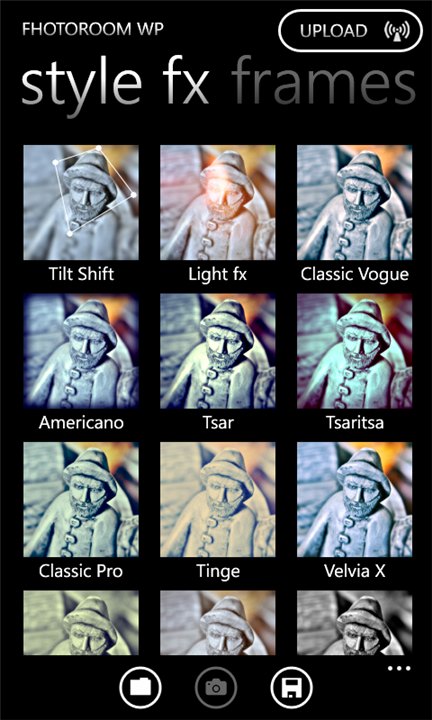
You've probably heard about Instaram, the super-popular iPhone (and now Android) app that makes your dull photos into cute and neat little pieces of art. That app is not available for Windows Phone as of now, but that's where Fhotoroom steps in. I find it an extremely good substitute, there's a great amount of nice filters, effects, frames etc. And it's free! On top of that, the user interface looks lovely and it's easy to use throughout (can't say the same about their website..).
Fhotoroom also shows popular and recent images from the Fhotoroom users (a lot of self-posing girls, don't know what's with that =D ). You can easily choose to upload your photos to many popular sites like Facebook, Twitter, Flickr, but you can just save them to your phone or directly to SkyDrive if that suits you the best.
You can get Fhotoroom from Windows Phone Marketplace for free
Photosynth
A photosynth I took from Kirjurinluoto recreational area in Pori, Finland. It's easy to embed these synths to your own website if you don't want to give just a link.
First up is something people (using Windows Phones) have eagerly been waiting for: Microsoft's Photosynth that allows full 360° panorama images of the environment. This way you can capture everything you see around you in a way no regular photo ever could. Photosynth has been available for iPhones for quite some time, but now it's finally released for WP7 as well.
Firstly the bad news: on my phone the app seems to crash from time to time, in some occasions right after taking the photos for stitching, losing all the work I've just done. Secondly, the image resolution isn't quite as impressive I had been hoping for. The former is probably caused by bugs, we're talking about 1.0 version after all. As to image resolution, I'm not sure if it's there to stay or might it be upgraded in the future, when phones with more processing power are out.
The good news is that the stitching works surprisingly well. I've used Photosynth on an iPad 2 and that version had serious problem getting things right, but this WP7 version creates full 360 circles and stitches images impressively well. I've only taken few panoramas with it, so this is just my first impression. But none the less, Photosynth is free and you can easily share and save the picture into different places and locations. You can also autosave the image to your camera roll. Oh, and I love the Metro user interface of the app, it's very clear and simple to use.
Download Photosynth from the Windows Phone Marketplace for free
Fhotoroom
A regular photo filtered into a vibrant and tilt-shift blurred image. Some of the available Fhotoroom effects on the right.
You've probably heard about Instaram, the super-popular iPhone (and now Android) app that makes your dull photos into cute and neat little pieces of art. That app is not available for Windows Phone as of now, but that's where Fhotoroom steps in. I find it an extremely good substitute, there's a great amount of nice filters, effects, frames etc. And it's free! On top of that, the user interface looks lovely and it's easy to use throughout (can't say the same about their website..).
Fhotoroom also shows popular and recent images from the Fhotoroom users (a lot of self-posing girls, don't know what's with that =D ). You can easily choose to upload your photos to many popular sites like Facebook, Twitter, Flickr, but you can just save them to your phone or directly to SkyDrive if that suits you the best.
You can get Fhotoroom from Windows Phone Marketplace for free
Labels:
Fhotoroom,
mobile,
panorama,
photography,
photos,
Photosynth,
Windows Phone,
WP7
Tuesday, May 15, 2012
Stockholm in pictures (taken with Lumia 800)
Greetings from Stockholm, the 'capital of Scandinavia'! =) Indeed, this beautiful capital of Sweden can rightfully claim to that title as it is a city with such a long and interesting history. In the 17th century it was the center of one of the most powerful empires in all Europe.
The city has a lot to offer, let it be historical sites, shopping or just the beautiful scenery - the city is located on many island in a spot where Mälaren lake connects to the Baltic Sea. If you're ever traveling there for a couple of days, you should get a Stockholm card to enjoy vast amount of museums and attractions for free! And it works as an unlimited ticket to the public transit too.
This was the one of the first times I left my DSLR camera behind when traveling as I didn't feel like carrying it around anymore and wanted to test if I could capture the memories just with my phone (Nokia Lumia 800). As a result I took over a 100 shots and put them to a gallery for all of you to view (I'll add captions later on). Most of the pics are completely unedited and the panorama shots were taken on-phone with Creative Studio, a free app available for the Lumia phones. Click the link below to view the gallery.
Stockholm travel pictures gallery
Saturday, March 17, 2012
Creative Studio for Nokia Lumia phones
Nokia recently released Creative Studio, a simple yet very useful image capturing and editing tool for the Lumia Windows Phones. And it's free! Here is a quick look into it.
The app features a basic set of effects and editing capabilities, both for new pictures or pictures from your image albums. To me, however, the most precious feature is the panorama shooting mode that enables you easily to stitch four photos into a single panorama image. It's really fast and easy to use plus it's quite accurate (assuming the gyroscope sensor in your phone is ok).
Another cool feature of Creative Studio is the possibility to preview "face warp" and "live styles" effects on your phone's screen while pointing the camera on your desired target. Then, if you like what you see, just tap on the screen or the press the camera button to capture an image.
Taking photos is basically lag-free, even when taking the panorama shots. After you've taken a photo, in either regular mode, panorama mode or some of the live styles, you can choose to further edit the picture and repeat editing as many times as you see fit. You can also compare "before and after" before applying the effects. Only after you're done editing and hit Save, the effects are applied to full size images and it takes a few seconds.
Here's a few sample photos taken and edited with Creative Studio:
If you have a Nokia Lumia phone, you can (and should!) download Creative Studio from the Windows Phone Marketplace. It sort of combines different apps you might be using at the moment (image editing apps / panorama apps) and it definitely will be my #1 photo shooting app for the time being.
End note: One thing I've been dreaming about since I got my Lumia 800 is a panorama feature built-in with the actual camera app of the phone (like it was featured in HTC Radar). Now I've got a good panorama mode but in separate app. Luckily, the camera wizard at Nokia, Damian Dinning, has confirmed that a panorama feature is coming as a built-in feature in the near future so I really look forward to that too!
The app features a basic set of effects and editing capabilities, both for new pictures or pictures from your image albums. To me, however, the most precious feature is the panorama shooting mode that enables you easily to stitch four photos into a single panorama image. It's really fast and easy to use plus it's quite accurate (assuming the gyroscope sensor in your phone is ok).
Another cool feature of Creative Studio is the possibility to preview "face warp" and "live styles" effects on your phone's screen while pointing the camera on your desired target. Then, if you like what you see, just tap on the screen or the press the camera button to capture an image.
Taking photos is basically lag-free, even when taking the panorama shots. After you've taken a photo, in either regular mode, panorama mode or some of the live styles, you can choose to further edit the picture and repeat editing as many times as you see fit. You can also compare "before and after" before applying the effects. Only after you're done editing and hit Save, the effects are applied to full size images and it takes a few seconds.
Here's a few sample photos taken and edited with Creative Studio:
If you have a Nokia Lumia phone, you can (and should!) download Creative Studio from the Windows Phone Marketplace. It sort of combines different apps you might be using at the moment (image editing apps / panorama apps) and it definitely will be my #1 photo shooting app for the time being.
End note: One thing I've been dreaming about since I got my Lumia 800 is a panorama feature built-in with the actual camera app of the phone (like it was featured in HTC Radar). Now I've got a good panorama mode but in separate app. Luckily, the camera wizard at Nokia, Damian Dinning, has confirmed that a panorama feature is coming as a built-in feature in the near future so I really look forward to that too!
Labels:
Lumia,
Lumia 800,
mobile,
Nokia,
panorama,
photography,
photos,
software,
Windows Phone,
WP7
Wednesday, March 14, 2012
Windows Phone 7 lock screen wallpapers
I've noticed some cool WP7 wallpapers shared around on different tech blogs. Since I like taking photos and use them as my phone's lock screen background, I figured why not put the images here so everyone can use them if they will =) So, if interested, click on the image below to see a gallery of 480x800 pixel wallpapers for your Windows Phone!
Updated 1 April 2012: Added a bunch of new photos to the gallery of WP7 lockscreen wallpapers:
PS. I might add new pictures some day to that same folder so keep visiting it every once in a while if you like my photos!
Updated 1 April 2012: Added a bunch of new photos to the gallery of WP7 lockscreen wallpapers:
PS. I might add new pictures some day to that same folder so keep visiting it every once in a while if you like my photos!
Monday, November 21, 2011
HTC Radar sample photos
I put up an album on Picasa to show some of the photos I've taken with HTC Radar. The album includes indoor and outdoor photos as well as shots from day and night conditions. The album also includes Panorama mode examples and some shots that have been image-edited on the device. Click on the album link below to see the photos.
![]() |
| HTC Radar sample photos |
Saturday, October 22, 2011
Panorama photography
I love taking photos, but I have not been able to produce panoramas due to my old phone. Thus I have used my employer's iPad 2 to create some panoramas. I love how easy doing panoramas has become, and how good in quality they are (reflecting on the amount of effort put in making them).
The two software I have tried are: Occipital 360 Panorama and Microsoft Photosynth. Mostly I have used the former, because it seems to be faster and has better recognition when doing full 360° panoramas. On the other hand Photosynth seems to have better image quality when the stitching has gone well. It's worked great for partial, wide-angle photosynths like the example above. The examples on the official web sites of both software indicate, however, that with right skills (and device?) you can make some really amazing stuff with them.
If you're interested, you can see some of my 360 Panoramas at my homepage's panorama-page.
Multiple images stitched into one render with Photosynth.
Taken at our summer cottage in 2011.
The two software I have tried are: Occipital 360 Panorama and Microsoft Photosynth. Mostly I have used the former, because it seems to be faster and has better recognition when doing full 360° panoramas. On the other hand Photosynth seems to have better image quality when the stitching has gone well. It's worked great for partial, wide-angle photosynths like the example above. The examples on the official web sites of both software indicate, however, that with right skills (and device?) you can make some really amazing stuff with them.
If you're interested, you can see some of my 360 Panoramas at my homepage's panorama-page.
Subscribe to:
Posts (Atom)