Showing posts with label mobile. Show all posts

Sunday, December 29, 2013

Flickr and Lumia 1020 photos


In my previous post I was promising  Lumia 1020 sample photos and for some time now I've been uploading them to Flickr. Click on the link below to visit my profile consisting solely of images taken with the Nokia Lumia 1020 (filters have been added to some of the photos on-the-device).

Mobile photography with Lumia 1020 - random pictures

I hadn't used Flickr much before, but at some point they've done a nice overhaul on their user interface and I'm liking it a lot now. It's very modern and makes it easy to upload and add tags/titles to multiple photos at the same time. They also offer a whopping 1TB (yep, terabyte) of storage for your photos so it won't run out very easily!

In case you're not interested in saving photos there yourself, you can spend time browsing through some spectacular photos from all around the world taken by other users.

Flickr.com

PS. My blogging has been very limited this year and I am sorry for that. I'd still like to wish all my readers a great and successful year 2014! =)

Tuesday, September 24, 2013

Nokia Lumia 1020 unboxing

So today I finally received a delivery containing a new Nokia Lumia 1020! It's the ultimate photography phone of today with a whopping 41 megapixel sensor for clearer and sharper images. Sadly, it is also the last Nokia smartphone I'll ever own since Microsoft bought the mobile business of Nokia =(


Here's one sample photo (cropped and uncropped) of Kerava train station demonstrating the vast amount of details Lumia 1020 is capable of capturing! I'll post some sample photos later on, meanwhile you can check out some unboxing pics. I got the phone in the same signature yellow color as my Lumia 920, I think the phone looks absolutely gorgeous. Getting used to the camera bump on the back will take some time (it is "on the way" when holding it in hand), but it's the price to pay for the awesome photos, a price I'm very much willing to pay! =)


Sunday, August 25, 2013

Collection of Lumia 920 sample photos

Er.. it's been quite a while since my last post here, sorry about that! Nothing special has happened in my life, but perhaps after moving to capital region I've spent more time out, especially in Helsinki and it has to offer, so I've stopped writing here. Anyway, now that the summer is coming to an end I hope to write more often here!

One thing I haven't stopped at any point is taking photos. And I love to take a lot of them when I'm on the move. This year I haven't used much of my DSLR, instead I've mostly relied on my Nokia Lumia 920.  While Lumia 920 has been an absolute fantastic phone, in overall quality and especially the camera, I am most probably switching to the Lumia 1020 when it comes out. Perhaps after that I can rely fully on the phone's camera even on trips from where I'd love to snap high resolution photos for print. I'll get back to that if/when I get my hands on the device. =)

Meanwhile, here's a set of over 400 unedited photos taken with the Lumia 920. There's plenty of pictures from my trips, including Tallinn, Stockholm and San Francisco. Vast majority is from and around Kerava and Helsinki where I live and work respectively. Check out the photos on my SkyDrive by clicking the image below!


San Francisco by Night, captured with my Lumia 920

Wednesday, December 5, 2012

Train videos! =) (Shot with Lumia 920)

My nephew is very keen on trains, vehicles, dinosaurs and stuff like that. Live dinosaurs are hard to find and despite the cold Finnish winter even mammoths aren't that common.. But I happen to live next to a train station so I figured I might shoot some exciting videos for him to view =) Thus, I took my Lumia 920 into freezing conditions (it was around -10 to -15 °C ) and took a few short clips of trains passing by/stopping. The last one that with train going full speed just about a meter away was actually quite an experience to myself too!

Overall I think the video quality is exceptional, very crisp and steady thanks to the optical image stabilization found on the device. The noisy hum of the full speed trains are quite well recorded as well. Check out the 1080p full HD videos on YouTube!


Monday, November 26, 2012

Wireless charging with Fatboy pillow and Lumia 920


Here's a really short video of how easy charging can be with the Nokia Lumia 920. Just lay down your phone on the pillow and it'll start charging =) Check it out on YouTube:

Tuesday, October 23, 2012

Mobile broadband vs. fiber optic connection

The past month has been very busy for me! I've got a new job as Web Designer situated in the capital city and thus I've also moved to greater Helsinki region. This is the reason for such a quiet season on my blog, sorry about that!

There's still much stuff for me to sort out around here, but finally today I got my new internet connection working. For a short period I trialed a mobile broadband, "mokkula" as we call it here. For basic web surfing it was ok, but the speeds were varying a lot and the capability to sustain multiple connections failed to impress, even despite the 4G DC (?) signal was strong all the time. I need a solid connection for average web/download use that works even if I'm playing online on Xbox.

That is why I decided to return the mokkula and found out that there is an optical fiber connection available in my apartment building. They said it's the top-notch technology, especially designed for data transfers and fast speeds. This is also the impression I had of fiber optics and a quick Speedtest.net testing gave very, very consistent speeds. Almost all tests capped steady at 10.8 Mb/s for download and 2.0 Mb/s for upload. The ping number was constantly below 10ms, which is really impressive compared to the 60-80ms I got with the mokkula!

Speedtest.net results for my new broadband (Sonera's fiber optic) internet connection.

So this was my first post from my new home =) I've got some other new gadgets I haven't tried yet - hopefully I'll manage to test and write about them soon!

Friday, September 7, 2012

Nokia Lumia 920 and 820 announced

It's been a long time posting, but Nokia announced it's new Lumia phones in NewYork last Wednesday and they're worthy of a post!


The new Lumia phones, 920 and 820 are the successors of the current models Lumia 900 and Lumia 800 (which I have). While the old models will not be upgradable but to Windows Phone 7.8, the new models will run Windows Phone 8 that brings a whole lot new features to the table and better integration with Windows 8, also released later this year. Windows Phone 8 enables the new technical features both the Lumia 920 and 820 have.

Lumia 920

Lumia 920 is definitely the new flagship phone of Nokia. It has big 4'5" screen with a lot of exciting and innovative technology, such as doubled refresh rate, super high resolution (tops the retina display of iPhone 4s), NFC and most interestingly super sensitivity that enables you to use the phone even with your gloves on! This will be great especially in winter time, one thing I cried about in my earlier blog post. Lumia 920 also features wireless charging, which sounds awesome, something I didn't expect to see in mass products for some time.

To me personally, one of the greatest improvement of Lumia 920 is the Pureview technology they're bringing in. A floating lens enables Optical Image Stabilizaion (OIS) which should allow blur-free photos in low light conditions and stabilized videos instead of shaky ones. Some of the demos from the announcement event were really impressive and promising. I like low light photography and that's basically what the coming Finnish winter has to offer anyway =)

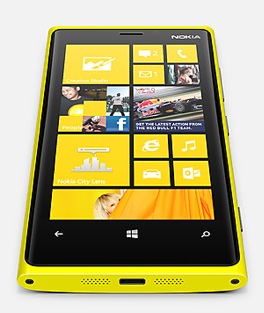
Lumia 920 comes in bright and vibrant colors red and yellow (in addition to white, black and gray) which makes the classic Lumia design look even more tempting. I'm really looking forward on getting hands on time with this phone! You can read more about Lumia 920 on Nokia's website.

Lumia 820

Lumia 820 is a classified as mid-range phone, although by it's specs it's not a far cry from Lumia 920 and certainly it's much more powerful and fuller of new features than the current flagship phone Lumia 900! It even has removable battery and micro-SD card that some people would've liked to see in Lumia 920 as well. Where 820 lacks the most in my opinion is the design. It differs oddly from the award-winning design of the Lumia 800 and 900. Also the screen resolution is only 800x480 which is the same as with Windows Phone 7.x.

Of course, some compromises have to be done with the mid-range phones. Still, the phone has large 4'3" screen and many of the cool stuff of the Lumia 920, like wireless charging and NFC. More about Lumia 820 on Nokia's website.

Availability, price?

The new Lumia products are very cool, but the event that went down in New York could've gone better. For instance, I couldn't see the official Nokia stream until halfway into the show. Also the people who where on stage seemed lacking enthusiasm and perhaps missed some rehearsals.. Such important events for Nokia deserve a much better execution. And why didn't CEO Elop speak more? He's great on stage! And then there's the "scandal", certainly a PR nightmare, that arose when their sample video of the OIS system proved to be misleading if not totally deceitful and faked.. But the worst of all, they didn't announce any information about the pricing or availability except "Q4 in select markets". I can't believe Nokia is still doing it this way, which is killing-the-hype-and-letting-competitors-sell-the-phones -way. I met Mr Elop at the Nokia AGM last spring and the only thing I complained about to him was the huge gap between announcing a phone and getting it to the market shelves. It's really frustrating they have not managed to fix this and I am afraid it will come with a heavy price to Nokia.

All I can hope now is that they'll bring these new superb new phones on the market fast! Surely before the holiday season. And I hope this time homeland of Nokia, Finland, won't have to wait until next year.

Update:

Just as I got this post out, rumours started to appear on the web that these phones would be shipping mid-to-late November, perhaps even earlier in Europe. I hope this is true so it would hit the markets just in time for the Christmas shoppers!

Secondly, Nokia apologized the OIS video mess, then stepped up and took The Verge outdoors for a real photo session with Lumia 920 with Pureview and some competing smartphone flagships like iPhone 4S and Samsung Galaxy III to see how much Nokia's OIS improves the image quality in low light conditions.

Tuesday, July 17, 2012

Quiet Summer Time on the Blog

Me and a reindeer in Lapland Finland =)

I'm sorry for the pause in my writing to this blog. It's summer time, my favorite season of all, and I have been outdoors, on vacations and in a news block so I haven't had much to write about. I hope I haven't let my few followers down! I expect this quiet time to continue as my second part of vacation begins and hopefully summer heat will finally reach Finland at some point as well!

To give you at least something fresh to look at, here's two mobile photo albums: one from my trip to Oulanka National Park in Kuusamo and the other from a lovely summer day at my home town of Rauma. All photos were taken with my Nokia Lumia 800. Sadly, the battery died at the end of the second day in the middle of the National Park. The third day, however, was rainy so there's not much you're missing except overall gray photos and not-so-jolly hikers =)

Photos from Oulanka National Park, Kuusamo, Finland
Photos from Old Rauma (UNESCO World Heritage Site), Rauma, Finland

Have a great summer time everyone!

Saturday, June 23, 2012

Microsoft, the cool kid

Windows Phone 8 start screens

The title of this post is something I could not have imagined to say just few years back. But things change, and the technology sector for sure is constantly evolving. I believe things can change dramatically either by innovation or pressure from the competition. In Microsoft's case I think both are prominent.

In the last few years Apple has been growing so fast that everyone else seems to be the underdogs now.  Despite having a small share in the PC market throughout it's history, Apple now dominates the tablet market which many think is the way of the future, "post-PC era" as it's called. Apple's innovation (and overwhelming success) in the tablet and phone market has been the major wake up call for Microsoft.

The Surface tablet from Microsoft. Drool-worthy.

I think they've gotten the message and now, and are taking big and fast moves to change their own identity. With Windows 8, Windows Phone 8 and the Surface tablets Microsoft is making their debut as the cool corporation, dumbing the boring, gray old face we've all gotten used to. There is doubt over how Windows 8 will succeed on the dektop/laptop market. But for tablets, it is fantastic. And by bringing their very own tablet to the game, Microsoft clearly states they are serious about it.

So, next fall will be interesting. With Windows products as cool and elegant as Apple's, will Microsoft be able to push it big time into the tablet and phone market? Hard to tell, but when I saw the Surface tablets with their bright, vibrant keyboards/covers, stylish metal chassis and Metro tiles running on it's screen, I was WOW and basically ready to buy. Quite an achievement for Microsoft, a company a regular Apple guy like me so much loathed not so long time ago.

Saturday, June 2, 2012

Photosynth and Fhotoroom for WP7

This week was interesting on the mobile photography sector as I took two phone apps into use: Photosynth and Fhotoroom. Here's a quick look into them.

Photosynth


A photosynth I took from Kirjurinluoto recreational area in Pori, Finland. It's easy to embed these synths to your own website if you don't want to give just a link.

First up is something people (using Windows Phones) have eagerly been waiting for: Microsoft's Photosynth that allows full 360° panorama images of the environment. This way you can capture everything you see around you in a way no regular photo ever could. Photosynth has been available for iPhones for quite some time, but now it's finally released for WP7 as well.

Firstly the bad news: on my phone the app seems to crash from time to time, in some occasions right after taking the photos for stitching, losing all the work I've just done. Secondly, the image resolution isn't quite as impressive I had been hoping for. The former is probably caused by bugs, we're talking about 1.0 version after all. As to image resolution, I'm not sure if it's there to stay or might it be upgraded in the future, when phones with more processing power are out.

The good news is that the stitching works surprisingly well. I've used Photosynth on an iPad 2 and that version had serious problem getting things right, but this WP7 version creates full 360 circles and stitches images impressively well. I've only taken few panoramas with it, so this is just my first impression. But none the less, Photosynth is free and you can easily share and save the picture into different places and locations. You can also autosave the image to your camera roll. Oh, and I love the Metro user interface of the app, it's very clear and simple to use.

Download Photosynth from the Windows Phone Marketplace for free

Fhotoroom

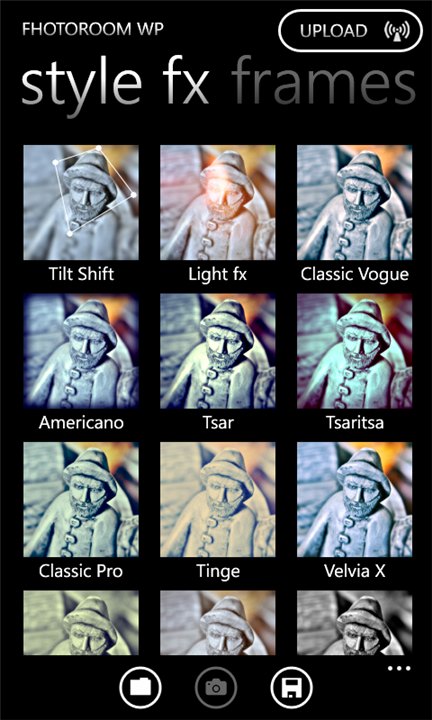
A regular photo filtered into a vibrant and tilt-shift blurred image. Some of the available Fhotoroom effects on the right.

You've probably heard about Instaram, the super-popular iPhone (and now Android) app that makes your dull photos into cute and neat little pieces of art. That app is not available for Windows Phone as of now, but that's where Fhotoroom steps in. I find it an extremely good substitute, there's a great amount of nice filters, effects, frames etc. And it's free! On top of that, the user interface looks lovely and it's easy to use throughout (can't say the same about their website..).

Fhotoroom also shows popular and recent images from the Fhotoroom users (a lot of self-posing girls, don't know what's with that =D ). You can easily choose to upload your photos to many popular sites like Facebook, Twitter, Flickr, but you can just save them to your phone or directly to SkyDrive if that suits you the best.

You can get Fhotoroom from Windows Phone Marketplace for free


Tuesday, May 15, 2012

Stockholm in pictures (taken with Lumia 800)


Greetings from Stockholm, the 'capital of Scandinavia'! =) Indeed, this beautiful capital of Sweden can rightfully claim to that title as it is a city with such a long and interesting history. In the 17th century it was the center of one of the most powerful empires in all Europe.

The city has a lot to offer, let it be historical sites, shopping or just the beautiful scenery - the city is located on many island in a spot where Mälaren lake connects to the Baltic Sea. If you're ever traveling there for a couple of days, you should get a Stockholm card to enjoy vast amount of museums and attractions for free! And it works as an unlimited ticket to the public transit too.

This was the one of the first times I left my DSLR camera behind when traveling as I didn't feel like carrying it around anymore and wanted to test if I could capture the memories just with my phone (Nokia Lumia 800). As a result I took over a 100 shots and put them to a gallery for all of you to view (I'll add captions later on). Most of the pics are completely unedited and the panorama shots were taken on-phone with Creative Studio, a free app available for the Lumia phones. Click the link below to view the gallery.

Stockholm travel pictures gallery


Monday, April 23, 2012

Storage in the Cloud


These days when Internet connections are fast and everywhere, saving data on local hard drive is rapidly becoming obsolete. Many applications are already running on external servers rather than on the user's computer as well. It's a very fascinating scene - it gives the freedom to save data/apps in one place but use it anywhere, on multiple devices from desktop computers to phones.

"Cloud" services as such aren't entirely a new thing, however. I'd imagine e.g. Picasa Web Albums can be counted as one and I've been using it for years. But it's been a very specific service. Today, there are fully functional web-apps, vast amount of services but also plain and simple cloud storages, They've been around for some time too, but now their use among regular users are exploding, thanks to the extremely user-friendly interfaces (e.g. Dropbox) and system level integration in Mac OS X (iCloud) and upcoming Windows 8 OSes (SkyDrive).

I don't have experience from iCloud (even though I use a Mac), but I've been getting familiar with SkyDrive since I use it a lot on my phone. In fact, I am slowly moving away from physically connecting the phone to my Mac to transfer images and videos, I simply save them from my phone to my SkyDrive folders and they're safe there even if something happened to my phone. SkyDrive actually has automatic image back-up from the phone, but I don't use that (I want to trash bad pics immediately). Same functionality is in iCloud backing up your docs, apps, music, pics etc. automatically. So even if your back-up hard drive was destroyer along with your device, the stuff will still be safe on servers far away, and you can fetch the stuff back. Pretty cool!

Left: SkyDrive app on Windows Phone 7.5. Right: Dropbox icon in Mac OS X.

My version of OS X cannot run SkyDrive application so I can't tell about that, but browsing through the files and folders and uploading stuff is pretty convenient through web browser as well. Dropbox, on the other hand is fantastically integrated into OS X desktop itself, it appears as if it was a local folder. Just drag and drop files and they'll synch into cloud! Ready for you to use on different platforms whenever necessary.

So if you're thinking about getting a back-up hard drive or a new USB-memory stick, think again, they might not be necessary at all! Most of the big players in tech industry are now offering some sort of cloud storages/services, mostly for free! You should check them out.

Update: Google Drive went official today so it joins the competition of the largest Cloud storages. Engadget has put up a nice comparison table
 

Links:

SkyDrive from Microsoft
Dropbox
iCloud from Apple
Google Drive from Google

Wednesday, March 28, 2012

Lumia 800 software update rolling out


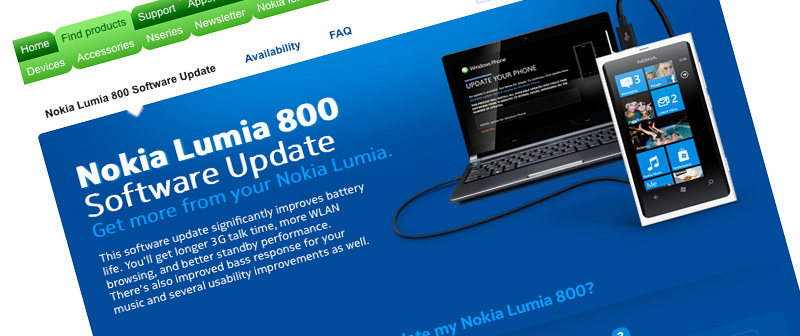
As I'm writing this post, the much awaited software update (version 1600.2487.8107.12070) for Nokia Lumia 800 is being installed on my phone. The update should significantly improve the battery performance and it also includes some usability improvements and fixed bass audio levels.

Update instructions can be found from Nokia's Lumia 800 Software Update page. The availability page there is also pretty neat, now I know for certainty that my Lumia 800 is a German Country Variant 059L7F7 (I bought it from Amazon Germany unlocked) =)

More background information about the update procedure itself at can be read at Nokia Conversations.

The battery has drained out quite quickly before now, which is why I previously posted some battery saving tips. Extra battery life is most welcome, but I'm still more anxiously waiting for the future updates that should be on their way, including camera software fixes + tethering support.

Saturday, March 17, 2012

Creative Studio for Nokia Lumia phones

Nokia recently released Creative Studio, a simple yet very useful image capturing and editing tool for the Lumia Windows Phones. And it's free! Here is a quick look into it.


The app features a basic set of effects and editing capabilities, both for new pictures or pictures from your image albums. To me, however, the most precious feature is the panorama shooting mode that enables you easily to stitch four photos into a single panorama image. It's really fast and easy to use plus it's quite accurate (assuming the gyroscope sensor in your phone is ok).

Another cool feature of Creative Studio is the possibility to preview "face warp" and "live styles" effects on your phone's screen while pointing the camera on your desired target. Then, if you like what you see, just tap on the screen or the press the camera button to capture an image.


Taking photos is basically lag-free, even when taking the panorama shots. After you've taken a photo, in either regular mode, panorama mode or some of the live styles, you can choose to further edit the picture and repeat editing as many times as you see fit. You can also compare "before and after" before applying the effects. Only after you're done editing and hit Save, the effects are applied to full size images and it takes a few seconds.

Here's a few sample photos taken and edited with Creative Studio:


If you have a Nokia Lumia phone, you can (and should!) download Creative Studio from the Windows Phone Marketplace. It sort of combines different apps you might be using at the moment (image editing apps / panorama apps) and it definitely will be my #1 photo shooting app for the time being.

End note: One thing I've been dreaming about since I got my Lumia 800 is a panorama feature built-in with the actual camera app of the phone (like it was featured in HTC Radar). Now I've got a good panorama mode but in separate app. Luckily, the camera wizard at Nokia, Damian Dinning, has confirmed that a panorama feature is coming as a built-in feature in the near future so I really look forward to that too!

Wednesday, March 14, 2012

Windows Phone 7 lock screen wallpapers

I've noticed some cool WP7 wallpapers shared around on different tech blogs. Since I like taking photos and use them as my phone's lock screen background, I figured why not put the images here so everyone can use them if they will =) So, if interested, click on the image below to see a gallery of 480x800 pixel wallpapers for your Windows Phone!

Updated 1 April 2012: Added a bunch of new photos to the gallery of WP7 lockscreen wallpapers:


PS. I might add new pictures some day to that same folder so keep visiting it every once in a while if you like my photos!

Saturday, March 10, 2012

HTC Radar photos + video

I found a SkyDrive folder with a few pictures and a video of my HTC Radar. Originally I took those photos mainly to show how the exterior of the phone looked like as I was about to sell it (I had just gotten Nokia's Lumia 800 and wasn't in need to hold two new smartphones).

You can see the pictures in this HTC Radar image folder on my SkyDrive. Here's the video where I hold and flip the phone + turn it on:


HTC Radar was my first Windows Phone and it was a really good device, solid, slim and fast. You can read my HTC Radar review from earlier post on this blog.

Monday, February 20, 2012

Battery saving tips for Nokia Lumia 800

One of the main problems of smartphones today seems to be the rather poor battery life - thanks to the amount of sensors, components and big screens. It's also one of the downsides of Nokia's Lumia 800, but here's a few tips for a little longer battery life based on my own experiences:

  • Turn off  background tasks on as many apps as possible (Settings -> applications -> background tasks). You should also check out applications' own settings since many have multiple options for using network data and push notifications (e.g. the Facebook app)
  • Reduce push email frequency (Settings -> email+accounts -> select account -> Download new content)
  • Turn off 3G if you don't surf the web much (Settings -> mobile network -> Highest connection speed). This has had surprisingly big impact on the battery life, especially on days when I don't use the phone much.
  • Turn off Wi-Fi if you don't have wireless networks at home or work (Settings -> WiFi). Otherwise I like to keep it on, since I haven't noticed it wasting huge amounts of battery charge (might depend heavily on the amount of surfing and downloading, though).
  • Turn on Flight mode during the night (if you don't expect or WANT to receive calls) =) This has been the most effective power saver (guess it's basically the same as built-in battery saver mode, except you can turn on Wi-Fi etc. while on Flight mode)

Nokia Care (@NokiaHelps via Twitter) also hinted that I should make a backup of my phone and then reinstall it. I did that and ever since the phone has performed better than before and hasn't had any of those sudden deaths, e.g. battery dying overnight. So that is something you might also want to try if Nokia's own firmware updates via Zune or Windows Phone Connector on Mac haven't helped on battery life oddities.


Monday, January 30, 2012

TuneIn Radio on WP7/Lumia 800

I've been testing the TuneIn Radio app a bit on WP7 Nokia Lumia 800. I found this app very interesting since it lists a vast amount of radio stations around the world in a neat and user-friendly interface. Most importantly, it also finds the local radio stations. I don't listen to radio nor music that much, but since I didn't have a radio before, it's great to finally have a device with this feature as well =)


At first I thought that only the pre-installed Zune app supports the built-in FM radio of Lumia 800, but luckily TuneIn Radio also supports it since it's interface is more simpler and pleasant to use. It's quite cool that TuneIn Radio can either use the FM radio or a web stream, even on small Finnish local stations, which impressed me for sure. On local stations both  options seem to work fine, but on some national stations TuneIn Radio seems to have difficulties to tune the FM radio and rather relies on the web stream (guess the headphones aren't that good of an antenna).

You can browse through available channels by geographical location, genres or language. You can also find podcasts with TuneIn Radio. It's easy to add your favorite channels to presets or pin them to start screen for quick access later on. The app keeps the music playing smoothly under lock screen and even while playing games, but I did have some problems trying to switch radio stations, causing the app to quit instead.

Half an hour of listening using the FM tuner and phone speakers drained about 4% of the battery charge. Using the web stream and speakers actually spent a little less, which surprised me. Anyway, the results are from my non-scientifically-proof tests, so you shouldn't take those numbers too seriously.

TuneIn Radio is featured in the Nokia Collection (not pre-installed on the phone) in Windows Phone Marketplace but it can also be found elsewhere in the Marketplace. Not sure what's the difference is between those two apps, but I assume the one found in Nokia Colletion is optimized for the Lumia phones.

Saturday, January 21, 2012

Sports Tracker revisited

Some time ago I wrote about Sports Tracker. While I concluded that the app is great and fun, the accuracy should be better. Well, now I've been using a Windows Phone 7 version of it on Nokia's Lumia 800 and it seems to be consistently more accurate than on iPhone 3G. Maybe it's the polycarbonate body? See the maps below for some comparison:

iPhone:
Lumia 800:

I'll also add a screenshot to show how accurate the GPS can be. In this shot you can see I went across the road on different points when heading away and heading back. It's pretty cool:


Another plus with the WP7 version seems to be the battery drainage. Running around 42 mins outdoors in -4 degrees Celsius used about 4-5% of the battery, which is vastly less than on the iPhone 3G. Originally I intended to use the iPhone as my "sports tracker" phone, but now that it seems to work better on the Lumia, I think I'm sticking to it =)

Oh, and one more plus for the app on WP7: I can switch apps while on the go. For example: I press Stop (pause) on Sports Tracker view, switch on the camera, Foursquare or whatever, then return to Sports Tracker app and press Resume to continue with running or other activity. Seems to work brilliantly.

You can get Sports Tracker for WP7 from Windows Phone Marketplace.

Wednesday, January 18, 2012

Winter + Touch Screen = Ouch!


Winter has arrived in Finland and there's at least one thing that reminds me of that even when indoors: the dried out and broken skin on my hands. The damage is mostly visible on my right hand and that's because I use my phone with it.

When you use a capacitive touch screen phone, you have to use it with bare hands. And doing that in Finnish winter,  when temperatures can be below -20°C, it can be quite uncomfortable. Even slight winds make your hands freeze even faster. My hands have frozen up few times, when checking out SMS while walking downtown, or checking Facebook notifications while waiting a bus.

I have heard about gloves that actually work with capacitive screens, but I can imagine they're not so good in extreme low temperatures and it would be silly to buy separate cloves just for this purpose. So, I hope there will be some improvement/innovation in this field of smart phone usability some day in the future. =)