Showing posts with label Lumia 800. Show all posts

Tuesday, July 17, 2012

Quiet Summer Time on the Blog

Me and a reindeer in Lapland Finland =)

I'm sorry for the pause in my writing to this blog. It's summer time, my favorite season of all, and I have been outdoors, on vacations and in a news block so I haven't had much to write about. I hope I haven't let my few followers down! I expect this quiet time to continue as my second part of vacation begins and hopefully summer heat will finally reach Finland at some point as well!

To give you at least something fresh to look at, here's two mobile photo albums: one from my trip to Oulanka National Park in Kuusamo and the other from a lovely summer day at my home town of Rauma. All photos were taken with my Nokia Lumia 800. Sadly, the battery died at the end of the second day in the middle of the National Park. The third day, however, was rainy so there's not much you're missing except overall gray photos and not-so-jolly hikers =)

Photos from Oulanka National Park, Kuusamo, Finland
Photos from Old Rauma (UNESCO World Heritage Site), Rauma, Finland

Have a great summer time everyone!

Tuesday, May 15, 2012

Stockholm in pictures (taken with Lumia 800)


Greetings from Stockholm, the 'capital of Scandinavia'! =) Indeed, this beautiful capital of Sweden can rightfully claim to that title as it is a city with such a long and interesting history. In the 17th century it was the center of one of the most powerful empires in all Europe.

The city has a lot to offer, let it be historical sites, shopping or just the beautiful scenery - the city is located on many island in a spot where Mälaren lake connects to the Baltic Sea. If you're ever traveling there for a couple of days, you should get a Stockholm card to enjoy vast amount of museums and attractions for free! And it works as an unlimited ticket to the public transit too.

This was the one of the first times I left my DSLR camera behind when traveling as I didn't feel like carrying it around anymore and wanted to test if I could capture the memories just with my phone (Nokia Lumia 800). As a result I took over a 100 shots and put them to a gallery for all of you to view (I'll add captions later on). Most of the pics are completely unedited and the panorama shots were taken on-phone with Creative Studio, a free app available for the Lumia phones. Click the link below to view the gallery.

Stockholm travel pictures gallery


Wednesday, March 28, 2012

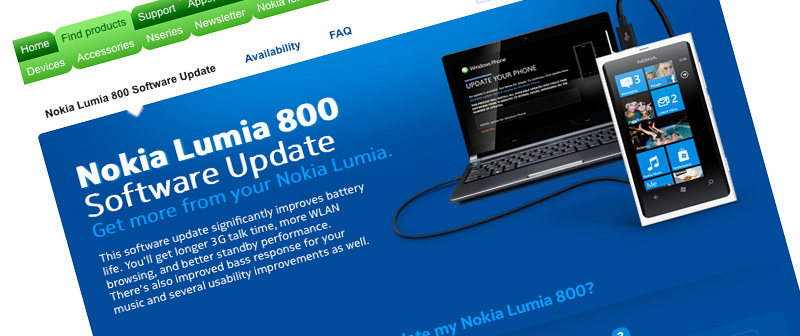
Lumia 800 software update rolling out


As I'm writing this post, the much awaited software update (version 1600.2487.8107.12070) for Nokia Lumia 800 is being installed on my phone. The update should significantly improve the battery performance and it also includes some usability improvements and fixed bass audio levels.

Update instructions can be found from Nokia's Lumia 800 Software Update page. The availability page there is also pretty neat, now I know for certainty that my Lumia 800 is a German Country Variant 059L7F7 (I bought it from Amazon Germany unlocked) =)

More background information about the update procedure itself at can be read at Nokia Conversations.

The battery has drained out quite quickly before now, which is why I previously posted some battery saving tips. Extra battery life is most welcome, but I'm still more anxiously waiting for the future updates that should be on their way, including camera software fixes + tethering support.

Saturday, March 17, 2012

Creative Studio for Nokia Lumia phones

Nokia recently released Creative Studio, a simple yet very useful image capturing and editing tool for the Lumia Windows Phones. And it's free! Here is a quick look into it.


The app features a basic set of effects and editing capabilities, both for new pictures or pictures from your image albums. To me, however, the most precious feature is the panorama shooting mode that enables you easily to stitch four photos into a single panorama image. It's really fast and easy to use plus it's quite accurate (assuming the gyroscope sensor in your phone is ok).

Another cool feature of Creative Studio is the possibility to preview "face warp" and "live styles" effects on your phone's screen while pointing the camera on your desired target. Then, if you like what you see, just tap on the screen or the press the camera button to capture an image.


Taking photos is basically lag-free, even when taking the panorama shots. After you've taken a photo, in either regular mode, panorama mode or some of the live styles, you can choose to further edit the picture and repeat editing as many times as you see fit. You can also compare "before and after" before applying the effects. Only after you're done editing and hit Save, the effects are applied to full size images and it takes a few seconds.

Here's a few sample photos taken and edited with Creative Studio:


If you have a Nokia Lumia phone, you can (and should!) download Creative Studio from the Windows Phone Marketplace. It sort of combines different apps you might be using at the moment (image editing apps / panorama apps) and it definitely will be my #1 photo shooting app for the time being.

End note: One thing I've been dreaming about since I got my Lumia 800 is a panorama feature built-in with the actual camera app of the phone (like it was featured in HTC Radar). Now I've got a good panorama mode but in separate app. Luckily, the camera wizard at Nokia, Damian Dinning, has confirmed that a panorama feature is coming as a built-in feature in the near future so I really look forward to that too!

Wednesday, February 29, 2012

Capturing everyday life and sharing it on YouTube

When looking from a multimedia perspective, one could easily say we're living in an era of YouTube. I have to admit I was sort of a late adopter to YouTube. Back then I only used it when a friend sent me some funny home video and stuff like that. Today it's totally different. If you saw a cool TV ad, heard some nice song or found out that a trailer has been released for some interesting movie, it's YouTube you turn to for help. It's like the Wikipedia of multimedia.

All modern smartphones tend to have high-definition video recording capabilities, most of the "dumbphones" and point-and-shoot cameras also sport some sort of video recording these days. The possibility to capture quality video (and to take good photos) was one of the key requirements for me when I was switching from an iPhone 3G to something new.


Nokia's Lumia 800 hasn't let me down in the tasks I have bought it for. Sure the autofocus is a bit too eager when shooting video and there are some bugs when taking photos, but otherwise I'm loving the possibility to capture everyday moments, even if they come across unexpectedly. Let it be a brother's dog going mad about digging snow or capturing the full beauty of downtown Dubai area, it's there, stored on your mind and camera's memory.

Once you've captured stuff, YouTube makes it darn easy to share. I only had a few, many years old videos on my YouTube channel before getting the Lumia, but nowadays I upload videos there every now and then. It's thanks to the user-friendly interface plus the very easy but extremely useful edit tools, which I just recently discovered. My videos might not be of spectacular quality, but things like correcting color balance conveniently on YouTube is much appreciated.

Doing little editing and fixing on your videos is easy on YouTube.

Even if you wouldn't consider yourself to be the Steven Spielberg of mobile filming, you should still join YouTube. You can be there without trying to become an internet phenomena with millions of viewers, but just to share videos privately with your family for example. It's a really nice service. Thanks Google for keeping up YouTube!

You can check out some of my random videos on my YouTube channel.

Monday, February 20, 2012

Battery saving tips for Nokia Lumia 800

One of the main problems of smartphones today seems to be the rather poor battery life - thanks to the amount of sensors, components and big screens. It's also one of the downsides of Nokia's Lumia 800, but here's a few tips for a little longer battery life based on my own experiences:

  • Turn off  background tasks on as many apps as possible (Settings -> applications -> background tasks). You should also check out applications' own settings since many have multiple options for using network data and push notifications (e.g. the Facebook app)
  • Reduce push email frequency (Settings -> email+accounts -> select account -> Download new content)
  • Turn off 3G if you don't surf the web much (Settings -> mobile network -> Highest connection speed). This has had surprisingly big impact on the battery life, especially on days when I don't use the phone much.
  • Turn off Wi-Fi if you don't have wireless networks at home or work (Settings -> WiFi). Otherwise I like to keep it on, since I haven't noticed it wasting huge amounts of battery charge (might depend heavily on the amount of surfing and downloading, though).
  • Turn on Flight mode during the night (if you don't expect or WANT to receive calls) =) This has been the most effective power saver (guess it's basically the same as built-in battery saver mode, except you can turn on Wi-Fi etc. while on Flight mode)

Nokia Care (@NokiaHelps via Twitter) also hinted that I should make a backup of my phone and then reinstall it. I did that and ever since the phone has performed better than before and hasn't had any of those sudden deaths, e.g. battery dying overnight. So that is something you might also want to try if Nokia's own firmware updates via Zune or Windows Phone Connector on Mac haven't helped on battery life oddities.


Sunday, February 5, 2012

LEGO phone camera rack

I had a boring Sunday and came up with a fun idea of using LEGOs to build a camera rack for my phone. Nokia Lumia 800 can stand vertically by itself, but for horizontal photos (e.g. photo timer for portraits) it needs some help. This simple rack is made out of LEGO Technic blocks from the Space Shuttle model and features adjustable vertical tilt and a lock system to keep the tilt.

Here's a few photos of the thing I built. I must say that LEGOs are so fun and I couldn't imagine more useful and creative toys  for anyone, from children to adults =)


Monday, January 30, 2012

TuneIn Radio on WP7/Lumia 800

I've been testing the TuneIn Radio app a bit on WP7 Nokia Lumia 800. I found this app very interesting since it lists a vast amount of radio stations around the world in a neat and user-friendly interface. Most importantly, it also finds the local radio stations. I don't listen to radio nor music that much, but since I didn't have a radio before, it's great to finally have a device with this feature as well =)


At first I thought that only the pre-installed Zune app supports the built-in FM radio of Lumia 800, but luckily TuneIn Radio also supports it since it's interface is more simpler and pleasant to use. It's quite cool that TuneIn Radio can either use the FM radio or a web stream, even on small Finnish local stations, which impressed me for sure. On local stations both  options seem to work fine, but on some national stations TuneIn Radio seems to have difficulties to tune the FM radio and rather relies on the web stream (guess the headphones aren't that good of an antenna).

You can browse through available channels by geographical location, genres or language. You can also find podcasts with TuneIn Radio. It's easy to add your favorite channels to presets or pin them to start screen for quick access later on. The app keeps the music playing smoothly under lock screen and even while playing games, but I did have some problems trying to switch radio stations, causing the app to quit instead.

Half an hour of listening using the FM tuner and phone speakers drained about 4% of the battery charge. Using the web stream and speakers actually spent a little less, which surprised me. Anyway, the results are from my non-scientifically-proof tests, so you shouldn't take those numbers too seriously.

TuneIn Radio is featured in the Nokia Collection (not pre-installed on the phone) in Windows Phone Marketplace but it can also be found elsewhere in the Marketplace. Not sure what's the difference is between those two apps, but I assume the one found in Nokia Colletion is optimized for the Lumia phones.

Thursday, January 5, 2012

Golla mobile pouch for my Lumia 800


Heya! I just bought a new Golla mobile pouch for my Nokia Lumia 800. The pouch I've been using so far is also from Golla, which I originally got for my iPhone 3G. The old pouch is still in perfect shape, but I'll spare it for the iPhone and also for leisure use of Lumia 800, such as taking it for running trips etc. (Sports Tracker seems to have more accurate GPS with Lumia than with that old iPhone, btw).

Anyway, did you know Golla actually originates from my small hometown of Rauma, Finland? =) There is a town part called Kolla  (check it out on Google Maps), where the now international company was founded. In the very distinct dialect of Rauma region, words starting with K tend to change to more exotic G. Thus I guess they came up with the name of the company.

Golla products really are good in quality and they're very stylish, imho. You should get one to protect your gadgets as well!

Monday, January 2, 2012

Nokia Lumia 800 with WP7

Happy new year everyone! I hope this year will be happy for Nokia as well since it's pretty much the make-or-break year for the Windows Phone platform that Nokia is now relying on. The first flagship of this new era, the Lumia 800, has been out for a couple of months now already and I got my own early December, SIM-free/unlocked from Amazon Germany. Here's some of my thoughts on the device.


Design and screen


The reason why I wanted exactly this WP7 phone was the design. The phone is shaped out of single piece of polycarbonate and this approach makes it look simply elegant. The phone has sharp edges on top and bottom, but has rounding in the depth-axis and edges so it feels good in hand. Also the polycarbonate as a material feels surprisingly solid, and in cool temperatures it doesn't turn cold like metal bodies would. There's just a couple of buttons visible: volume, power and camera.

You can see some unboxing pictures to see what's in the retail package of Lumia 800.

One major part of the beautiful design of the device is the curved glass 3.7" AMOLED screen that unites into the body of the device seamlessly. The screen is strong Gorilla Glass so it shouldn't get scratches very easily. The screen is very responsive and the curving makes it pleasant to use. The ClearBlack technology on the AMOLED screen means that the black colors truly are black, unlike on backlit screen technologies. The screen also produces more vibrant and brighter colors than regular LCD displays. In bright sunlight, the screen is still very readable, unlike many other phones I've seen that tend to reflect the bright environment on their screen surface. When using the black theme on Windows Phone, it all looks absolutely brilliant.

But the screen has some lacks too. Despite otherwise excellent viewing angle the screen has a green/blue tint that is most visible when there's plenty of white background, like webpages and email app. The other downside is the pen tile technology used on the screen. It makes the WP7 standard 480x800 resolution look less than that. In fact, text is more readable and sharper on my HTC Radar that has lower pixel density due to slightly larger screen.


The greenish tint is visible in when viewed in different angles (Lumia 800 on the background, HTC Radar in front)


Camera

One main reason for me to get a Lumia 800 was the camera. The specs are good - an 8M pixel camera with Carl Zeiss optics and HD video (720p). I wanted the phone to replace my old point-and-shoot camera.

Knowing Nokia's history with good camera phones the quality of the photos turned out disappointing. On mixed artificial light conditions the photos have an odd green tint and even on some day time photos the photos turn somewhat greenish. In some conditions there's even more odd, deep green or red square color spot in the middle. I have no idea how it can result such results since before pressing down the camera button, it looks good on the screen. From what I've read on the net, it is a software bug that Nokia has promised to fix. I hope this is the case.

Otherwise the photos are good quality. Maybe slightly blurry but ok in  general. The 720p HD video looks very sharp and correct in colors. The auto focus just has some hard time finding the right focus which makes annoying focusing moments on otherwise solid video. I recommend taking focus on your target once and then quickly change the auto focus setting off (this works well in long distance landscape videos).

You can see some sample HD video samples at my YouTube channel (The Dubai videos are all shot with Lumia 800). You can also view some Lumia 800 sample photos.


Software


One of the advantages of a Nokia device over other Windows Phone devices is the software. Microsoft and Nokia reportedly have a unique agreement that gives Nokia more freedom to do stuff with their phones.

Most important Nokia-only built-in software is the Drive application that is a fully functional, voice guided GPS Navigator. From what I have tested, it works well and the interface is very simple. It lacks in features though, but for basic use it's all you need. You can also download maps to your phone so that cellular data usage will be minimal. I hope that they will make the Drive application support full offline mode which could be useful abroad where you don't have a cellular data plan on use. There is also Nokia Maps, which is a pleasant mapping feature for pedestrian use.  It features point-by-point walking navigation, search for popular places and satellite and public transport map views.

Other major Nokia software is the Nokia Music app, but I haven't unfortunately used it much. It features a streaming Mix radio with different channels, mp3 store and a gigs near me finder. Music lovers probably will like it.


My favorite apps on Lumia 800, Foursquare and Sportstracker, utilize the neat metro style user interface of Windows Phone 7.5. Lockscreen and home view on the second row.


Performance an other

Lumia 800 works seamlessly and swiftly throughout. The processor is 1.4 Ghz which is high-end among WP7 devices. The other major specs are good too - 512 MB RAM and 16 GB storage that are enough for most of the people's needs. On some occasions the physical Windows buttons on the bottom of the device seem to be too close to the actual screen and cause unintentional presses.

The Lumia 800 comes with a plastic cover for the phone with the original packaging which is a nice move by Nokia.

The battery power seems quite weak. In active use the phone needs to be re-charged in less than 24 hours. In regular use it still manages just something like 1,5 days. It feels odlly short time and I  hope this is also some of the bugs Nokia will fix with an software update.

Some people might find it disappointing too that there is no front-facing camera nor NFC. Both of those features are present in the Meego N9 that initially introduced us to the magnificent polycarbonate design that Lumia 800 also has. For full technical specs, you can check out GSM Arena's Nokia Lumia 800 page.


Final notes


I can tell you, I waited for this phone for months very eagerly. I had something like 4 different pre-orders from websites in various Lumia 800 launch countries because Nokia decided not to release it in Finland in first wave.

The phone met most of my expectations but unlike the usual Nokia quality it had some lacks and bugs. This might be because of the amazingly fast schedule Nokia pushed a phone with a Windows Phone ecosystem - less than a year from the announcement to move into a totally new mobile environment.

After using the phone for about a month, I am, despite the bugs very pleased with the phone. It is pleasant to use, and the overall user experience couldn't be much better. If Nokia manages to fix the camera and battery oddities, great. Despite the lack in some hardware specs, it still is a very good phone. But you should try it before buying. I can imagine, for example, that the display isn't optimal for reading experience if that's what you mostly use your phone for. On the other hand, it's great for games and other media stuff.

Despite being named as the current flagship phone, Nokia probably has plans to introduce something even better in the near future. After all, the "800" in Nokias new naming method clearly leaves room for even more powerful flagship phones. The rumors talk about Lumia 900. We'll have to wait and see.

Thursday, December 15, 2011

Hello from Dubai!

I returned from a short vacation in Dubai few days ago. The trip was a success since I finally got to visit Burj Khalifa, the tallest building in the world (on my previous trips to Dubai, it was closed).

Not going to talk much about the trip itself, but I can say that my new mobile phones, HTC Radar and Nokia Lumia 800 both with WP 7.5 were in active use. The Lumia 800 was my phone/back-up camera on the trip. The green tint is present in many of the photos taken in mixed-artificial light, but otherwise the quality of the photos is good, although in very dark they turn bit blurry. Despite some hard-time focusing, the HD 720p video in the Nokia is very impressive in quality!

HTC Radar worked as my Wi-Fi connector/poolside gadget/Angry Birds console during flights and did that job extremely well. I think it had way better battery life than the one of Lumia 800 (not sure how much the mobile network activity drained it's battery, though). When talking about pictures, HTC Radar had the color balance almost always correct + the Panorama shot mode was really a nice feature to capture some amazing landscapes in Dubai!

Check out the image albums below to see some photos from the trip. You can find the 720p HD (sample) videos shot with Nokia Lumia 800 from my YouTube account.


Thursday, December 1, 2011

Quick note on Nokia Lumia 800


Multiple efforts later I found an unlocked Nokia Lumia 800 available on Amazon Germany and this week, finally, the phone found it's way to me. Once upon I saw the design of N9 embedded with a neat, growing ecosystem I knew it was the phone I've got to have and just couldn't wait until next year for it to go on sale here in Nokia's homeland of Finland.

The device is just as beautiful and elegant as I expected, and WP7 looks and feels absolutely brilliant on it. But the phone has some lacks too. The most annoying thing to me is an odd green tint that appears when taking pictures, especially indoors. I hope it will be fixed with a software update. Also the gorgeous screen of the Lumia 800 has it's pros and cons, but I'll write more about them and other things once I've had more time with phone.

I am taking the Lumia 800 on vacation with me, along with my HTC Radar so hopefully I can have some true "field tests" with both phones, especially by photographing and sharing some moments to my fellows back home.

Thursday, October 27, 2011

Nokia goes Windows Phone

It's been 8 months now since Nokia announced the strategic partnership with Microsoft, involving a complete adaptation of the Windows Phone operating system in all price categories. Yesterday at Nokia World, finally, the first Nokia Windows Phone 7.5 "Mango" devices were introduced.

 Nokia Lumia 800 running Windows Phone 7.5 Mango

Since I've known for months that there would be a Nokia phone with WP7, I have patiently kept using my old phone in hope of a jump to the next level. I loved the design and simplistic aspects of N9 very much, but there were two major defects that I simply couldn't ignore: 1) high price 2) lack of future apps. Now just to make it clear: I'm not an app-fanatic but e.g. when searching for some cool photo/panorama apps for the N9 from Ovi Store, there just didn't seem to be anything to satisfy my needs.

Nokia's Lumia 800 was exactly what I was hoping for. Ok, front facing camera is missing, but in the end I figured I probably wouldn't need that so much. NFC would've been cool too, but it's more of the future features as well. But everything else was pretty much great stuff: The gorgeous N9 design, good camera and other decent specs + the benefits of the Windows Phone eco-system.

Then I realized they wouldn't release it in Finland, not this year anyway.

I was quite pissed off. Of course, I understand and approve CEO Elop's strategy to go to big markets with a rumble first, but still.. Finland is Nokia's homeyard and I wonder if they have ever before decided to skip the premiere launch of a flagship product here.

Anyway, so here I am, still patiently waiting.. or more to say, trying to figure the heck out on what phone to buy next. Yet, perhaps some hope remains. Thanks to the loose borders of the EU (at least in the economic terms), I might be able to order a phone for me all the way from UK or Germany. I surely hope I can somehow get the phone I want and all this wait hasn't been for nothing.