Sunday, December 29, 2013

Flickr and Lumia 1020 photos


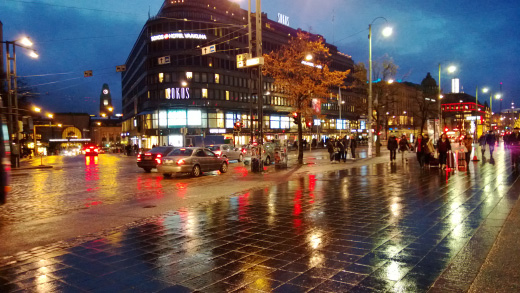
In my previous post I was promising  Lumia 1020 sample photos and for some time now I've been uploading them to Flickr. Click on the link below to visit my profile consisting solely of images taken with the Nokia Lumia 1020 (filters have been added to some of the photos on-the-device).

Mobile photography with Lumia 1020 - random pictures

I hadn't used Flickr much before, but at some point they've done a nice overhaul on their user interface and I'm liking it a lot now. It's very modern and makes it easy to upload and add tags/titles to multiple photos at the same time. They also offer a whopping 1TB (yep, terabyte) of storage for your photos so it won't run out very easily!

In case you're not interested in saving photos there yourself, you can spend time browsing through some spectacular photos from all around the world taken by other users.

Flickr.com

PS. My blogging has been very limited this year and I am sorry for that. I'd still like to wish all my readers a great and successful year 2014! =)

Tuesday, September 24, 2013

Nokia Lumia 1020 unboxing

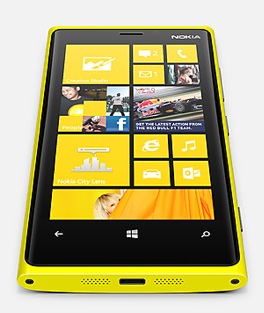
So today I finally received a delivery containing a new Nokia Lumia 1020! It's the ultimate photography phone of today with a whopping 41 megapixel sensor for clearer and sharper images. Sadly, it is also the last Nokia smartphone I'll ever own since Microsoft bought the mobile business of Nokia =(


Here's one sample photo (cropped and uncropped) of Kerava train station demonstrating the vast amount of details Lumia 1020 is capable of capturing! I'll post some sample photos later on, meanwhile you can check out some unboxing pics. I got the phone in the same signature yellow color as my Lumia 920, I think the phone looks absolutely gorgeous. Getting used to the camera bump on the back will take some time (it is "on the way" when holding it in hand), but it's the price to pay for the awesome photos, a price I'm very much willing to pay! =)


Sunday, August 25, 2013

Collection of Lumia 920 sample photos

Er.. it's been quite a while since my last post here, sorry about that! Nothing special has happened in my life, but perhaps after moving to capital region I've spent more time out, especially in Helsinki and it has to offer, so I've stopped writing here. Anyway, now that the summer is coming to an end I hope to write more often here!

One thing I haven't stopped at any point is taking photos. And I love to take a lot of them when I'm on the move. This year I haven't used much of my DSLR, instead I've mostly relied on my Nokia Lumia 920.  While Lumia 920 has been an absolute fantastic phone, in overall quality and especially the camera, I am most probably switching to the Lumia 1020 when it comes out. Perhaps after that I can rely fully on the phone's camera even on trips from where I'd love to snap high resolution photos for print. I'll get back to that if/when I get my hands on the device. =)

Meanwhile, here's a set of over 400 unedited photos taken with the Lumia 920. There's plenty of pictures from my trips, including Tallinn, Stockholm and San Francisco. Vast majority is from and around Kerava and Helsinki where I live and work respectively. Check out the photos on my SkyDrive by clicking the image below!


San Francisco by Night, captured with my Lumia 920

Sunday, January 6, 2013

Some thoughts on Halo 4

Ok, now after having Halo 4 for about two months, I'll post a few of my opinions on the game!

Overview and the Campaign


Here we go again!

I had some serious doubts about 343 Industries taking over the Halo saga after Bungie, but those doubts vanished really quickly once I started playing Halo 4. In fact, it only needed the simple yet elegant start screen =D With the image of the Forerunner planet Requiem and just plain space with awesome piece of music, I was feeling really excited already.

First thing you'll notice is that the game is beautiful, really really beautiful! It took me few minutes just to move to the next room because I was gazing at the details and the super rich light effects Halo 4 has. It's amazing how smooth the game still runs, I mean it's still the same old Xbox 360 hardware! The controls are little re-arranged, there's more armor capabilities and weapons, but overall it feels very familiar.

I'm not going to go into the details of the story of Halo 4, except that it's actually a love story! Yes, believe it or not. One epic love story, starring Master Chief and Cortana, who after 8 years of service is starting to deteriorate since artificial intelligences' "best-before" date is at 7 years. Sure, there is a super villain Forerunner called Didact on the Requiem (where MC ended up in the Legendary ending of Halo 3). Didact is on a mission to destroy mankind and Earth, but preventing that has been made a second-in-line concern over the health of Cortana. Rescuing her is the priority for Master Chief. We've all used to seeing them together over the course of 10 years so emotionally it works so that the player too wants to keep Cortana alive. We've seen Master Chief save the world quite some times already, so it's good he has new priorities - to keep his lady Cortana alive. Awesome!

Cortana looks better than ever even though her mind is troubled!

I think the campaign is more cinematic than before, well, maybe in Halo 2 they had as much of cutscenes and spoken lines. At least that's how it felt like. In Halo 4 there is a lot of in-game talk between Cortana and MC, which is great. Also the facial animations are much much better and realistic than what they were in Reach.

On the minus side of the campaign are the usual things: It's too short and frankly, I think it was way too easy. Playing a game on a skill level called Legendary should be like pain all the way through, having to repeat each and every scene a million times. But in Halo 4 there were only few places where that occurred. Oh, and another complaint is the variety of the maps. I liked it that there were maps for all vechiles and stuff, but to me it felt like too much time inside Forerunner or human constructions ( = boring environment). So kind of repetitive levels in that sense, would've liked more nature themed maps etc.

Multiplayer games

I'll put it simple: Halo 4 has the most advanced multiplayer games of any Halos, in my opinion. There are plenty of new things, e.g. showing vechiles and special weapons on the HUD radar and having all kinds of tactical set ups for your armor. All this makes it seemingly easier for the player, but the variety of different armor combinations creates many many strategies each player can follow. However, this is also a downside and some people might not like the extended complexity. For instance I'm stuck to the very basic: having infinite speed boost, grenade damage boost, Promethean vision (see through walls) and long distance guns. I admit, should try all other options too, but I'm too lazy... Despite the changes, the gameplay still feels familiar and you can get into it pretty quickly.


Classic game types are there too, but with new twists. In capture the flag, for example, the flag carrier can now also use his Magnum while carrying the flag!

There is a nice amount of game types, one of the new ones is Regicide where top scorer is the King and the rest of the players try to kill him, fun! There's two really big new concepts in Halo 4, first is Spartan Ops which is like a continuing Campaign Add-On, chapters that you can play either solo or online. Second thing is the Infinity slayer that is enabled in many gamelists. The game gives you bonuses for good tricks and kills you make in the game. Once a certain point level is reached, you can pick a weapon/armor ability out of three choices. And I like it that there is much more medals and things you get awarded on, like driving the flag carrier back to your home base is something you previously had to do with no personal benefit.

One thing that is much better in Halo 4 compared to Reach is the multiplayer maps that come out of box. They've been specifically made to suit multiplayer games and they're not just campaign map rip-offs like in Reach. The maps are really beautiful, like big team slayer map Exile (see video below). Also, I like the fact that there's no mechanical Forge maps in the multiplayer game, at least not yet.


Full HD gameplay sample from big team multiplayer map Exile. (My nick is AliquisNJ and as you can see, I'm not very pro =D But say hi if you bump into me in a game!)

Concolusion

I'd say Halo 4 continues the tradition of epic storylines, beautiful graphics and music with the greatest feature being the multiplayer games that simply rock!

Oh, and Happy New Year folks! =)

Wednesday, December 5, 2012

Train videos! =) (Shot with Lumia 920)

My nephew is very keen on trains, vehicles, dinosaurs and stuff like that. Live dinosaurs are hard to find and despite the cold Finnish winter even mammoths aren't that common.. But I happen to live next to a train station so I figured I might shoot some exciting videos for him to view =) Thus, I took my Lumia 920 into freezing conditions (it was around -10 to -15 °C ) and took a few short clips of trains passing by/stopping. The last one that with train going full speed just about a meter away was actually quite an experience to myself too!

Overall I think the video quality is exceptional, very crisp and steady thanks to the optical image stabilization found on the device. The noisy hum of the full speed trains are quite well recorded as well. Check out the 1080p full HD videos on YouTube!


Monday, November 26, 2012

Wireless charging with Fatboy pillow and Lumia 920


Here's a really short video of how easy charging can be with the Nokia Lumia 920. Just lay down your phone on the pillow and it'll start charging =) Check it out on YouTube:

Saturday, November 24, 2012

Nokia Lumia 920 - my new phone!

I've got a new phone again - Nokia Lumia 920! I wanted it in yellow and boy it looks hot! Had my doubts about the glossy finish, but it's really neat. It's a nice, fresh contrast to the classy, matte black Lumia 800.

This time it's not about an actual need to take up years gap of advances as it was when I switched from iPhone 3G to Windows Phone a year ago, but more of an huge interest on the new, feature-rich WP8 flagship device from Nokia. Especially the low-light camera capabilities interest me since I like taking photos and on mixed/low-light, Lumia 800 can't do squat (see sample below).


Sample comparison. From the left: Lumia 800, Lumia 920 auto settings, Lumia 920 Night Shot mode (all lights are out inside unlike in the first two shots)

In addition to the image stabilization feature, the phone has been packed with so much cool stuff - the super sensitive, high resolution screen (yes it looks amazingly sharp compared to Lumia 800), it has WP8 with more speed, power and customization + apps (I can now play Angry Birds Space and Star Wars!) ;D plus NFC and wireless charging that I haven't had time to test yet!

Based on two days testing, I can say that yes, Nokia really delivers this time and the floating lens stuff is not a gimmick! Sure, the photos taken in really dark night condition tend out to have some blur when zoomed 100% but most of the time the photos are truly remarkable.


PS. the phone is a bit bulky if you compare it to other smartphones out there, but I think this has been made into a much bigger "issue" than it really is. The size and weight really doesn't bother me at all, if anything it feels really solid and fits perfectly to hand!

PPS. Don't get me wrong, Lumia 800 is still a very solid smartphone and takes great daylight photos. Will get WP 7.8 on it when it comes out.

Tuesday, November 20, 2012

Lock screen wallpapers for Nokia Lumia 920

Earlier this year I posted some lock screen photos for WP7 (480x800 pixels), but now that WP8 is out I figured I should post some of the wallpapers in higher resolution. I decided to set the images in 768x1280 pixel resolution because that's what the awesome Lumia 920 is sporting.

Unfortunately, I still have to wait for my phone since Nokia is having problems delivering the devices to retailers.. even it's own flagship store in Helsinki where I pre-ordered! =/

Anyway, click on the image below to get the wallpapers from my SkyDrive!


Sunday, November 11, 2012

Xbox 360 Halo 4 Limited Edition


For quite some time I've considered buying a new Xbox console because the old one was quite noisy and lacking with some ports and built-in wireless. So when Halo 4 was announced Microsoft also announced a special edition Xbox 360 console to be released simultaneously with the game on November 6th 2012. As a Halo franchise fan, that was the perfect time and excuse to finally buy the new console.

Even though the Xbox Halo 4 Limited Edition console is quite expensive and everyone is expecting a totally new Xbox hardware next year (rumored to be Xbox 720 or something), I thought what the heck! It looks great and unique, ships with two cool controllers, Halo 4 bundle copy and has huge hard drive. And yes, it's very quiet. No sound at all if you've installed the game, at least. On my old Xbox 360 Elite the humming was still quite loud even when game had been installed.

So here's just a few pics of the console and controllers. It has a mechanical looking, Forerunner-ish stripes in cyan and silver and the plastic cover is transparent both on the console and the controllers. Also all the lights are blue instead of the classic Xbox green. I'll write more about my impressions of Halo 4 on another post =)


Tuesday, October 23, 2012

Mobile broadband vs. fiber optic connection

The past month has been very busy for me! I've got a new job as Web Designer situated in the capital city and thus I've also moved to greater Helsinki region. This is the reason for such a quiet season on my blog, sorry about that!

There's still much stuff for me to sort out around here, but finally today I got my new internet connection working. For a short period I trialed a mobile broadband, "mokkula" as we call it here. For basic web surfing it was ok, but the speeds were varying a lot and the capability to sustain multiple connections failed to impress, even despite the 4G DC (?) signal was strong all the time. I need a solid connection for average web/download use that works even if I'm playing online on Xbox.

That is why I decided to return the mokkula and found out that there is an optical fiber connection available in my apartment building. They said it's the top-notch technology, especially designed for data transfers and fast speeds. This is also the impression I had of fiber optics and a quick Speedtest.net testing gave very, very consistent speeds. Almost all tests capped steady at 10.8 Mb/s for download and 2.0 Mb/s for upload. The ping number was constantly below 10ms, which is really impressive compared to the 60-80ms I got with the mokkula!

Speedtest.net results for my new broadband (Sonera's fiber optic) internet connection.

So this was my first post from my new home =) I've got some other new gadgets I haven't tried yet - hopefully I'll manage to test and write about them soon!

Wednesday, September 19, 2012

The new Outlook and Skydrive

Recently Microsoft has been modernizing it's  core products in quite a fast pace. I've already talked about Windows 8, but now also Outlook.com and Skydrive.com have new, fresh and modern appearance and they're totally worth a try.

SkyDrive
 

I've used SkyDrive a lot in the past year because of the great integration with my Nokia Lumia 800 Windows Phone. Instead of always connecting my phone to the computer to download the images, I quite often upload them to the cloud storage straight from my phone. The SkyDrive app on WP7 is pretty neat, but now that Skydrive.com has been totally modernized, I'm very pleased to use it on my computer.

The interface is very clear, simple and fits greatly to the browser window. You can easily have side panel to show extra info, or access the settings or social media share options, etc. The new SkyDrive site uses some modern HTML techniques that enables e.g. re-arranging photos with drag-and-drop gestures and uploading photos by dragging them from your desktop to the browser window, skipping the annoying "Select files to upload" type of dialogs!

One of the few things that annoy me is the fact that you can't rotate images that are already uploaded to SkyDrive. That should be fixed since sometimes the camera doesn't get the rotation of the image right, causing many portrait images rotated into landscape pics.

Outlook.com


I haven't used Hotmail much since it's always been my secondary email, but with the re-branding (to Outlook.com) I'm considering using it more than before. First of all the web email interface is better than anything else I've tried, even Gmail seems less easy to use compared to it. You can change the interface main color, reading pane position and more very easily.

One cool thing is also an extra panel that shows social media (FB, Twitter) content from the person who's email you are reading, nice! You can also chat on Facebook (also on SkyDrive) directly from Outlook.com without need to swap back to other browser tab or window. It's the same high social media integration that I've seen on Windows Phone.

Outlook.com could have many inboxes, from 3rd party services like Gmail, but I haven't tried that yet. What I did like was the option to create aliases for my old Hotmail account. The old email, macjuhruo@hotmail.com, obviously isn't the best possible, so just with few clicks I created a juho.ruohola@outlook.com alias that automatically forwards the mails to my Hotmail-account and inbox. There's still plenty of settings and stuff I haven't tried, but overall the impression of outlook.com is very positive.

Friday, September 7, 2012

Nokia Lumia 920 and 820 announced

It's been a long time posting, but Nokia announced it's new Lumia phones in NewYork last Wednesday and they're worthy of a post!


The new Lumia phones, 920 and 820 are the successors of the current models Lumia 900 and Lumia 800 (which I have). While the old models will not be upgradable but to Windows Phone 7.8, the new models will run Windows Phone 8 that brings a whole lot new features to the table and better integration with Windows 8, also released later this year. Windows Phone 8 enables the new technical features both the Lumia 920 and 820 have.

Lumia 920

Lumia 920 is definitely the new flagship phone of Nokia. It has big 4'5" screen with a lot of exciting and innovative technology, such as doubled refresh rate, super high resolution (tops the retina display of iPhone 4s), NFC and most interestingly super sensitivity that enables you to use the phone even with your gloves on! This will be great especially in winter time, one thing I cried about in my earlier blog post. Lumia 920 also features wireless charging, which sounds awesome, something I didn't expect to see in mass products for some time.

To me personally, one of the greatest improvement of Lumia 920 is the Pureview technology they're bringing in. A floating lens enables Optical Image Stabilizaion (OIS) which should allow blur-free photos in low light conditions and stabilized videos instead of shaky ones. Some of the demos from the announcement event were really impressive and promising. I like low light photography and that's basically what the coming Finnish winter has to offer anyway =)

Lumia 920 comes in bright and vibrant colors red and yellow (in addition to white, black and gray) which makes the classic Lumia design look even more tempting. I'm really looking forward on getting hands on time with this phone! You can read more about Lumia 920 on Nokia's website.

Lumia 820

Lumia 820 is a classified as mid-range phone, although by it's specs it's not a far cry from Lumia 920 and certainly it's much more powerful and fuller of new features than the current flagship phone Lumia 900! It even has removable battery and micro-SD card that some people would've liked to see in Lumia 920 as well. Where 820 lacks the most in my opinion is the design. It differs oddly from the award-winning design of the Lumia 800 and 900. Also the screen resolution is only 800x480 which is the same as with Windows Phone 7.x.

Of course, some compromises have to be done with the mid-range phones. Still, the phone has large 4'3" screen and many of the cool stuff of the Lumia 920, like wireless charging and NFC. More about Lumia 820 on Nokia's website.

Availability, price?

The new Lumia products are very cool, but the event that went down in New York could've gone better. For instance, I couldn't see the official Nokia stream until halfway into the show. Also the people who where on stage seemed lacking enthusiasm and perhaps missed some rehearsals.. Such important events for Nokia deserve a much better execution. And why didn't CEO Elop speak more? He's great on stage! And then there's the "scandal", certainly a PR nightmare, that arose when their sample video of the OIS system proved to be misleading if not totally deceitful and faked.. But the worst of all, they didn't announce any information about the pricing or availability except "Q4 in select markets". I can't believe Nokia is still doing it this way, which is killing-the-hype-and-letting-competitors-sell-the-phones -way. I met Mr Elop at the Nokia AGM last spring and the only thing I complained about to him was the huge gap between announcing a phone and getting it to the market shelves. It's really frustrating they have not managed to fix this and I am afraid it will come with a heavy price to Nokia.

All I can hope now is that they'll bring these new superb new phones on the market fast! Surely before the holiday season. And I hope this time homeland of Nokia, Finland, won't have to wait until next year.

Update:

Just as I got this post out, rumours started to appear on the web that these phones would be shipping mid-to-late November, perhaps even earlier in Europe. I hope this is true so it would hit the markets just in time for the Christmas shoppers!

Secondly, Nokia apologized the OIS video mess, then stepped up and took The Verge outdoors for a real photo session with Lumia 920 with Pureview and some competing smartphone flagships like iPhone 4S and Samsung Galaxy III to see how much Nokia's OIS improves the image quality in low light conditions.

Tuesday, August 21, 2012

Scotland/London/Olympics 2012

I spent the last 10 days of July in the United Kingdom with my friend, first in Scotland (Glasgow with visits to Edinburgh and the highlands) and then in London. We attended a few Olympic venues too; football in Glasgow, boxing and canoe slalom in London. I really enjoyed my time and Britain truly showed us it's hospitality.

This was my first visit to the UK, but certainly not the last! There's so much left to see in London alone. Click to see photo album from the trip. There's a mix of mobile photos (Lumia 800) in there too, including all panoramas.

I also used Photosynth quite a bit for static and interactive panoramas. Here's an interactive view from inside the Glasgow Cathedral.

Tuesday, July 17, 2012

Quiet Summer Time on the Blog

Me and a reindeer in Lapland Finland =)

I'm sorry for the pause in my writing to this blog. It's summer time, my favorite season of all, and I have been outdoors, on vacations and in a news block so I haven't had much to write about. I hope I haven't let my few followers down! I expect this quiet time to continue as my second part of vacation begins and hopefully summer heat will finally reach Finland at some point as well!

To give you at least something fresh to look at, here's two mobile photo albums: one from my trip to Oulanka National Park in Kuusamo and the other from a lovely summer day at my home town of Rauma. All photos were taken with my Nokia Lumia 800. Sadly, the battery died at the end of the second day in the middle of the National Park. The third day, however, was rainy so there's not much you're missing except overall gray photos and not-so-jolly hikers =)

Photos from Oulanka National Park, Kuusamo, Finland
Photos from Old Rauma (UNESCO World Heritage Site), Rauma, Finland

Have a great summer time everyone!

Saturday, June 23, 2012

Microsoft, the cool kid

Windows Phone 8 start screens

The title of this post is something I could not have imagined to say just few years back. But things change, and the technology sector for sure is constantly evolving. I believe things can change dramatically either by innovation or pressure from the competition. In Microsoft's case I think both are prominent.

In the last few years Apple has been growing so fast that everyone else seems to be the underdogs now.  Despite having a small share in the PC market throughout it's history, Apple now dominates the tablet market which many think is the way of the future, "post-PC era" as it's called. Apple's innovation (and overwhelming success) in the tablet and phone market has been the major wake up call for Microsoft.

The Surface tablet from Microsoft. Drool-worthy.

I think they've gotten the message and now, and are taking big and fast moves to change their own identity. With Windows 8, Windows Phone 8 and the Surface tablets Microsoft is making their debut as the cool corporation, dumbing the boring, gray old face we've all gotten used to. There is doubt over how Windows 8 will succeed on the dektop/laptop market. But for tablets, it is fantastic. And by bringing their very own tablet to the game, Microsoft clearly states they are serious about it.

So, next fall will be interesting. With Windows products as cool and elegant as Apple's, will Microsoft be able to push it big time into the tablet and phone market? Hard to tell, but when I saw the Surface tablets with their bright, vibrant keyboards/covers, stylish metal chassis and Metro tiles running on it's screen, I was WOW and basically ready to buy. Quite an achievement for Microsoft, a company a regular Apple guy like me so much loathed not so long time ago.

Saturday, June 2, 2012

Photosynth and Fhotoroom for WP7

This week was interesting on the mobile photography sector as I took two phone apps into use: Photosynth and Fhotoroom. Here's a quick look into them.

Photosynth


A photosynth I took from Kirjurinluoto recreational area in Pori, Finland. It's easy to embed these synths to your own website if you don't want to give just a link.

First up is something people (using Windows Phones) have eagerly been waiting for: Microsoft's Photosynth that allows full 360° panorama images of the environment. This way you can capture everything you see around you in a way no regular photo ever could. Photosynth has been available for iPhones for quite some time, but now it's finally released for WP7 as well.

Firstly the bad news: on my phone the app seems to crash from time to time, in some occasions right after taking the photos for stitching, losing all the work I've just done. Secondly, the image resolution isn't quite as impressive I had been hoping for. The former is probably caused by bugs, we're talking about 1.0 version after all. As to image resolution, I'm not sure if it's there to stay or might it be upgraded in the future, when phones with more processing power are out.

The good news is that the stitching works surprisingly well. I've used Photosynth on an iPad 2 and that version had serious problem getting things right, but this WP7 version creates full 360 circles and stitches images impressively well. I've only taken few panoramas with it, so this is just my first impression. But none the less, Photosynth is free and you can easily share and save the picture into different places and locations. You can also autosave the image to your camera roll. Oh, and I love the Metro user interface of the app, it's very clear and simple to use.

Download Photosynth from the Windows Phone Marketplace for free

Fhotoroom

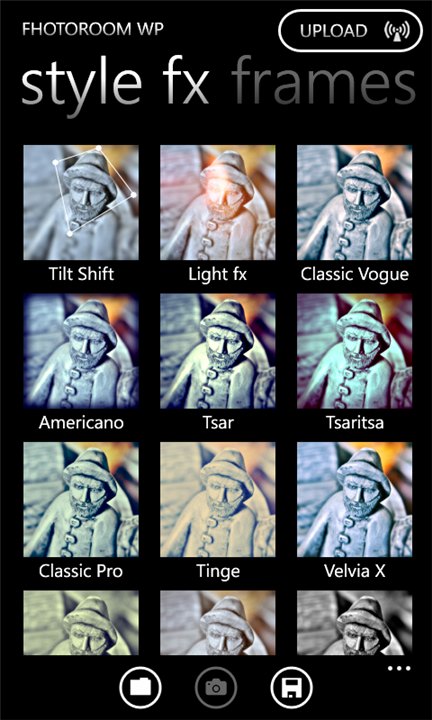
A regular photo filtered into a vibrant and tilt-shift blurred image. Some of the available Fhotoroom effects on the right.

You've probably heard about Instaram, the super-popular iPhone (and now Android) app that makes your dull photos into cute and neat little pieces of art. That app is not available for Windows Phone as of now, but that's where Fhotoroom steps in. I find it an extremely good substitute, there's a great amount of nice filters, effects, frames etc. And it's free! On top of that, the user interface looks lovely and it's easy to use throughout (can't say the same about their website..).

Fhotoroom also shows popular and recent images from the Fhotoroom users (a lot of self-posing girls, don't know what's with that =D ). You can easily choose to upload your photos to many popular sites like Facebook, Twitter, Flickr, but you can just save them to your phone or directly to SkyDrive if that suits you the best.

You can get Fhotoroom from Windows Phone Marketplace for free


Sunday, May 27, 2012

Windows 8 on Mac Mini

Ever since I saw the first video clips from the upcoming Windows 8 sometime in 2011 I wanted to see it live and try it myself. The Metro UI was simply looking so fresh and cool, coming from Microsoft after all! Sometime afterwards I started using Windows Phone 7.5 on HTC Radar and Nokia Lumia 800. WP7 also features Metro-styled Live Tiles and UI in many of the apps so it's pretty close to the Windows 8 Metro user interface.

Even despite Windows 8 consumer preview being available to public, for free, I had a problem: I was using a Mac instead of a PC and wasn't planning on buying a PC in the near future. It wasn't until late May 2012 when I got tipped (Thanks to @gadgetero on Twitter!) that the Win8 preview can be run on a Mac with ease, using VirtualBox virtualization software, also available for free download.

So I went and downloaded the Windows 8 consumer preview from Microsoft and VirtualBox from Oracle. I recommend to follow the instructions on OS X Daily.

Installing VirtualBox was very easy as was setting up the virtual machine and it's options. Really nice software! When I was a kid, virtual PC emulators for Mac cost a lot of money so it's cool you can nowadays get such quality stuff for free. Next up was the installation of Windows 8. It crashed during the installation once, but I think it was due to me being away from the computer (Win8 installed faster than I thought!). Despite the crash, I could finish the installation right after reboot with no further problems. Afterwards the VirtualBox Win8 always got stuck in the start up screen, but I could bypass this bug by changing the virtual machine boot order from the settings (Hard Disk as #1 boot drive).


 Windows 8 with Metro UI running on VirtualBox on my Mac Mini.

So what do I think about Windows 8 now that I've gotten the chance to try it? I think it's really great! Instead of the half-empty desktop and static icons I've used to, the Live tiles were truly alive, telling me info without opening the actual app. The ones that were immediately working for me were the E-mail and Weather (after set-up) tiles, but I can only imagine how cool it will be once all kinds of apps are built to utilize the Metro stuff to the max. Many have argued that the big tiles are not suitable for a mouse use on a big desktop computer screen, but I found them rather easy to use with a mouse too and I do love simplistic design. You can get a lot of info just looking at the tiles, plus to me it's like the quick place to launch any of my favorite apps, especially if I see there's some interesting new stuff going on in it. I don't need a gazillion icons (they tend to pile up on my desktop anyways). Of course it's not going to be an optimal start up view for everyone, but you can get to the old style Windows desktop and resource managing with one single click.

I love the vibrant colors, nice little animations and clear, fresh, neat interface Metro has to offer. Time will tell if I feel like that after months of using it, but the first impression is good! I can imagine Windows 8 will rock on a tablet since mobile devices are the ones where Metro is really meant to shine after all.

I have to admit the built-in preview apps themselves were quite buggy and crashed many times. Also my Mac Mini isn't the most powerful machine on Earth so e.g. games were so laggy they were impossible to use. But the basic Metro desktop etc. worked pretty smoothly, albeit not in full screen. But no matter if you're using a Mac or PC right now, you should give Windows 8 Consumer Preview a try, there's no complete escape from it anyway once it starts shipping later this year!

PS. thanks to @gadgetero again for the social links code on the right menu =)

Tuesday, May 15, 2012

Stockholm in pictures (taken with Lumia 800)


Greetings from Stockholm, the 'capital of Scandinavia'! =) Indeed, this beautiful capital of Sweden can rightfully claim to that title as it is a city with such a long and interesting history. In the 17th century it was the center of one of the most powerful empires in all Europe.

The city has a lot to offer, let it be historical sites, shopping or just the beautiful scenery - the city is located on many island in a spot where Mälaren lake connects to the Baltic Sea. If you're ever traveling there for a couple of days, you should get a Stockholm card to enjoy vast amount of museums and attractions for free! And it works as an unlimited ticket to the public transit too.

This was the one of the first times I left my DSLR camera behind when traveling as I didn't feel like carrying it around anymore and wanted to test if I could capture the memories just with my phone (Nokia Lumia 800). As a result I took over a 100 shots and put them to a gallery for all of you to view (I'll add captions later on). Most of the pics are completely unedited and the panorama shots were taken on-phone with Creative Studio, a free app available for the Lumia phones. Click the link below to view the gallery.

Stockholm travel pictures gallery


Wednesday, May 9, 2012

Steve Jobs biography

I'm not a bookworm sort of guy at all. In fact, I rarely read any printed material, but the official biography of Steve Jobs by Walter Isaacson was something I absolutely had to read. It took me some while to read this massive book, but it was totally worth it.

I must say the first half of the book was far more interesting than the second half. I think this is because of two things: firstly, in the beginning Steve Jobs, Wozniak, Gates and all the other legends of Silicon Valley were inventing the 21st century. It felt to me that so much more exciting stuff happened in the first decades of Apple. Second reason is that I simply remembered some of the stuff in the latter part of the book (I've been Apple user since 1991). Of course the extra details from more recent Apple history were interesting, but still, it's more about the development process of some of Apple's core products of today, rather than the birth of the characters or the tech sector as a whole.

The book didn't reveal anything extremely surprising about Jobs, I knew he was a really, REALLY difficult person. But a genius. Many mock Apple and Jobs, saying that he didn't invent anything since the technical innovations were already existing. But the book depicts well how Jobs visioned HOW the technology should be used in convenient way for the users. Perhaps the biggest news from the book for me was the bizarre diets and other obsessions Jobs had.

I am no book critic, but f you are even a bit interested in technology and IT-history, Jobs, Woz, Gates, Microsoft, Google, Apple or anything related, I think you should read this book!

Monday, April 23, 2012

Storage in the Cloud


These days when Internet connections are fast and everywhere, saving data on local hard drive is rapidly becoming obsolete. Many applications are already running on external servers rather than on the user's computer as well. It's a very fascinating scene - it gives the freedom to save data/apps in one place but use it anywhere, on multiple devices from desktop computers to phones.

"Cloud" services as such aren't entirely a new thing, however. I'd imagine e.g. Picasa Web Albums can be counted as one and I've been using it for years. But it's been a very specific service. Today, there are fully functional web-apps, vast amount of services but also plain and simple cloud storages, They've been around for some time too, but now their use among regular users are exploding, thanks to the extremely user-friendly interfaces (e.g. Dropbox) and system level integration in Mac OS X (iCloud) and upcoming Windows 8 OSes (SkyDrive).

I don't have experience from iCloud (even though I use a Mac), but I've been getting familiar with SkyDrive since I use it a lot on my phone. In fact, I am slowly moving away from physically connecting the phone to my Mac to transfer images and videos, I simply save them from my phone to my SkyDrive folders and they're safe there even if something happened to my phone. SkyDrive actually has automatic image back-up from the phone, but I don't use that (I want to trash bad pics immediately). Same functionality is in iCloud backing up your docs, apps, music, pics etc. automatically. So even if your back-up hard drive was destroyer along with your device, the stuff will still be safe on servers far away, and you can fetch the stuff back. Pretty cool!

Left: SkyDrive app on Windows Phone 7.5. Right: Dropbox icon in Mac OS X.

My version of OS X cannot run SkyDrive application so I can't tell about that, but browsing through the files and folders and uploading stuff is pretty convenient through web browser as well. Dropbox, on the other hand is fantastically integrated into OS X desktop itself, it appears as if it was a local folder. Just drag and drop files and they'll synch into cloud! Ready for you to use on different platforms whenever necessary.

So if you're thinking about getting a back-up hard drive or a new USB-memory stick, think again, they might not be necessary at all! Most of the big players in tech industry are now offering some sort of cloud storages/services, mostly for free! You should check them out.

Update: Google Drive went official today so it joins the competition of the largest Cloud storages. Engadget has put up a nice comparison table
 

Links:

SkyDrive from Microsoft
Dropbox
iCloud from Apple
Google Drive from Google